Lemon8 - Lifestyle Community
- 4.6
- Rating
- 10.00M
- Installs
- Free
- Price

 Analysis by App-foxy
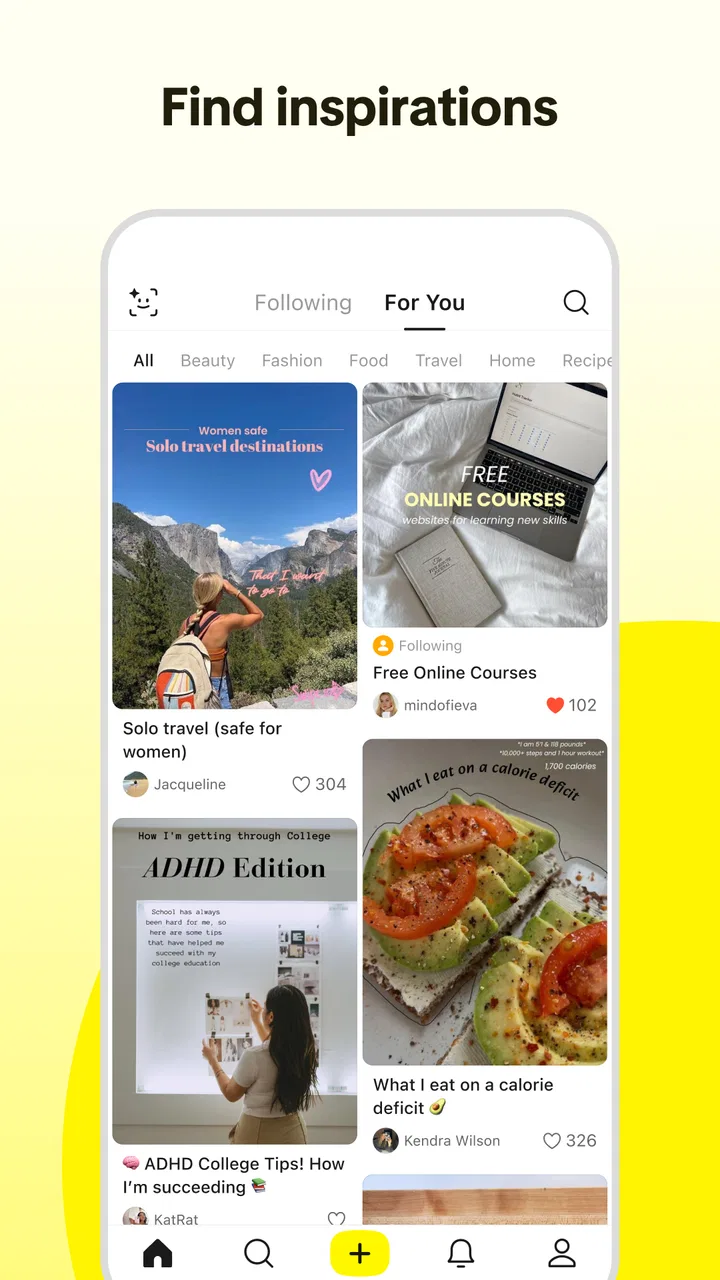
I found Lemon8 to be a lifestyle community built around browsing, saving, and sharing visually organized ideas rather than having quick conversations. It comes from TikTok Pte. Ltd., but it does not feel like a simple copy of TikTok’s short-video feed. The experience leans more toward photos, captions, recommendations, routines, recipes, outfits, travel inspiration, and other everyday discoveries that are easier to pause over and revisit.
That difference matters if you are deciding whether it belongs on your phone. I can imagine opening it while planning a weekend meal, looking for clothing combinations, collecting home ideas, or simply wanting a calmer stream of themed posts. I can also see why someone who prefers direct messaging, chronological updates, or a tightly controlled information diet might lose patience with it. My overall impression is that Lemon8 works best when you treat it as a visual idea notebook, not as a replacement for every other social platform.
How the reading and navigation experience feels
I find that the reading experience is shaped less by menus than by the way each creator presents an idea: images invite a quick scan, while captions reward a slower look. In this section, I focus on how that visual rhythm affects finding and judging useful posts, including a small habit that helps me avoid saving attractive but vague inspiration. That leads naturally to the question of how comfortable the same approach is in different everyday situations.
You May Also Like

 Blood Strike: 2.5 Anniversary
Blood Strike’s Loadouts Turn Every Drop Into a Tactical Gamble
A close look at Blood Strike’s custom loadouts: how fast access to signature weapons reshapes its battle royale rhythm, rewards preparation, and narrows the gap between fights.

 Pandora - Music & Podcasts
Pandora’s Music Is Easy to Start, but Harder to Recover
Pandora’s strength is its low-effort path from a seed to a station. Its weak spot is how much confidence it asks you to place in connection, setup, and quiet recovery.

 8 Ball Pool
 Is Built on Rivalries, Rematches, and Routine
A close look at the rivalries, rematches, shared routines, and unanswered safety questions that turn a quick pool match into a persistent mobile community.

 Samsung Music
’s Quiet Strength Is Playing What You Already Own
Its reach comes less from spectacle than from dependable access to a personal library. That simplicity is both the app’s strongest retention engine and its ceiling.

 AccuWeather: Weather Radar
AccuWeather Review: A Quick, Clear Forecast for Everyday Decisions
For everyday plans, the best forecast is the one you can understand quickly. AccuWeather makes rain timing, radar, and local conditions easy to act on, with a few trade-offs.

 Hill Climb Racing
Why Hill Climb Racing Still Turns Crashes Into One More Run
A tiny car, a bumpy hill and one more upgrade: Hill Climb Racing keeps resurfacing because its simple chaos makes every near-miss feel personal.
More From Our News Desk



A visually led feed with a slower browsing rhythm
The first thing I noticed was how strongly the design depends on visual scanning. Images do much of the work before I read a caption, so the app is easy to approach when I already know the kind of inspiration I want. A food post, packing list, beauty routine, or room arrangement can communicate its subject quickly through the image and layout. That makes casual discovery pleasant, especially when I am browsing with no fixed question in mind.
The trade-off is that visual clarity depends heavily on the quality of each post. Some entries are thoughtfully arranged, with useful text inside the image or a caption that explains the steps. Others are more decorative than informative. I found myself learning to pause before saving something: a polished picture may look helpful while offering little practical detail. That small habit prevents my saved collection from becoming a pile of attractive but unusable ideas.
For readers who need larger text, high contrast, or less visual density, the experience may require more effort. The app’s appeal comes from seeing many visual signals at once, so the feed can feel busy even when the individual posts are understandable. I would not describe it as difficult to navigate, but I would describe it as visually demanding. People who process information better when it is presented in a simple list may prefer a traditional article app, a notes tool, or a search engine.
Finding useful posts instead of endlessly scrolling
I get more value from Lemon8 when I enter with a small purpose. Searching for a broad theme such as travel or cooking can produce a lot of material, but a narrower intention gives me a better chance of finding something I can use. For example, instead of casually browsing food content, I might look for an easy lunch idea, a compact kitchen solution, or a packing checklist. This turns the feed from entertainment into a lightweight research tool.
One useful workflow is to save posts in batches and review them later rather than trying to act on every discovery immediately. I can browse during a break, collect a few promising ideas, and then compare them when I have time. That is especially useful for shopping decisions or trip planning, where the first attractive post is not necessarily the most practical one. I also recommend checking the full caption before saving; important context may appear below the image rather than in the preview.
The app is free, which makes experimenting with this workflow easy. Its store presence shows an average rating of 4.5 from roughly 254 thousand ratings, and it has passed 10 million installs. Those figures suggest that the format has found a substantial audience, although popularity does not remove the need to judge individual posts carefully. I would use the numbers as reassurance that the product is established, not as proof that every part of the experience will suit me.
Readable content depends on the creator
There is no single reading standard across the community. One creator may write a clear step-by-step caption, while another may place tiny text over a busy image. This inconsistency is important for anyone with reduced vision, reading fatigue, attention difficulties, or limited patience for deciphering stylized layouts. I often get the best results from posts with plain captions and generous spacing, but finding those posts requires some selection.
Language can also affect usefulness. Lifestyle communities often mix local references, product names, slang, and visual shorthand. Even when I understand the main subject, a post may be less useful if it assumes knowledge of a particular city, beauty routine, clothing size system, or shopping environment. I would treat many recommendations as starting points rather than universal instructions.
Organization helps, but it does not replace a personal system
Saving ideas is one of the app’s strongest practical uses, yet I would not rely on it as my only long-term archive. A saved post can remind me where an idea came from, but it may not be enough for a detailed project. When I am planning several meals or a trip, I prefer copying the key ingredients, measurements, or tasks into my own notes after browsing. That extra step turns inspiration into something I can actually follow.
This is a non-obvious strength and limitation at the same time: Lemon8 is good at helping me discover and compare visual possibilities, but it is not automatically a complete planning workspace. If I want a structured checklist, a searchable document, or a shared household plan, another app is usually better. Lemon8 is the front end of the process—the place where I gather ideas—not always the final place where I manage them.
Using it across abilities and everyday situations
I look at accessibility here as a practical question of effort: how much scrolling, visual sorting, and interpretation a person may need to do before an idea becomes useful. Lemon8 can fit into short, purposeful visits, but the creator-led layouts make the experience less predictable from post to post. I’ll also consider when a focused search or a different kind of tool is the more comfortable choice.
Motor considerations and the cost of constant browsing
For someone with limited hand movement, tremors, repetitive-strain discomfort, or difficulty making precise taps, any feed built around repeated scrolling can become tiring. Lemon8’s browsing model encourages small gestures over a long session, and that may be more demanding than reading a stationary article. I would use shorter sessions, pause between searches, and avoid treating endless discovery as the main goal.
The practical advantage is that the app can be useful in brief bursts. I can open it to check a few saved ideas, look at a particular topic, and leave without needing to complete a long interaction. That makes it more manageable than a platform whose value depends on constant posting or rapid replies. Still, the user has to create that boundary; the feed itself can keep offering more material.
People who use alternative input methods should judge the app through their own device settings and current operating system. Lemon8 is listed for Android devices running version 6.0 or later, and the current version is 10.6.2. Compatibility with the operating system is not the same thing as a guarantee that every navigation method will feel comfortable. I would test the main actions—opening a post, reading its caption, saving it, searching, and returning to the feed—before committing to it as a daily tool.
Sensory load, visual style, and attention
The app can be stimulating because images, text overlays, colors, and recommendations compete for attention. That is part of its charm for users who enjoy visual variety, but it may be tiring for people sensitive to clutter or rapid changes. I find it easier to use when I decide what I am looking for before opening the feed. A focused search reduces the feeling of being pulled from one subject to another.
It also helps to separate inspiration from instruction. A visually pleasing post can create a strong emotional response, but the actual advice may be incomplete, overly personal, or difficult to reproduce. For health, beauty, food, or financial decisions, I would verify important claims outside the app. Lemon8 is most reliable as a source of ideas and personal routines, not as a substitute for professional guidance.
For users who are easily distracted, the platform presents a familiar tension. It can make a boring planning task more approachable because the examples are attractive and concrete. At the same time, the next recommendation can interrupt the original task. My solution is to use a timer or a short list of what I want to collect. Without that limit, a five-minute search can become a much longer browsing session.
Situational access: when the app is genuinely useful
A realistic example is preparing for a short trip. I might search for compact packing ideas, save a few outfit combinations, compare storage suggestions, and then move the useful details into a checklist. The visual format helps me notice combinations I would not have imagined from plain text. The important step is transferring the final decisions elsewhere, because inspiration alone does not tell me what fits my luggage, budget, weather, or personal needs.
Another good situation is choosing a gift or refreshing a room on a limited budget. I can collect several styles before buying anything, which reduces the pressure to accept the first recommendation. I can also compare how different creators solve the same problem. This is where the community format is more helpful than a single retailer’s catalog: I see personal arrangements and practical compromises, not just finished product images.
The app may also suit someone who wants low-pressure participation. I do not need to publish immediately to get value from browsing and saving. A person who feels uncomfortable with live conversation may prefer this quieter form of involvement. However, the experience still reflects a social platform, so anyone seeking a completely private, offline, or distraction-free tool should choose a notes app, reader, or downloaded guide instead.
For older users or people new to visual social media, I would start with one topic and a small collection of saved posts. That makes the interface less overwhelming and creates a clear reason to return. I would not hand the app to someone expecting a conventional magazine or a simple recipe database without explaining that the content comes from a broad community and varies in quality.
What remains difficult
The largest barrier is inconsistency. Accessibility is not only about whether buttons can be reached; it is also about whether the content can be understood and acted on. Because creators control their own images and captions, readability, pacing, and clarity change from post to post. A person who needs predictable presentation may find this less comfortable than a professionally edited website.
Another barrier is the gap between discovery and verification. Recommendations may reflect a creator’s location, body type, budget, products, or personal routine. I have to do extra work to determine whether an idea applies to me. This is not necessarily a flaw in a community app, but it does mean that users with limited time, limited money, or specific practical needs should be selective rather than assuming that popular-looking content is suitable.
There is also a social and emotional cost to highly curated lifestyle material. Even when I open the app for simple ideas, repeated exposure to polished homes, outfits, meals, or routines can make ordinary life look less organized than it really is. I get more from the platform when I treat posts as examples, not standards. If browsing regularly leaves me comparing myself with strangers, a conventional search tool or a focused hobby forum would probably be healthier.
Users who need immediate answers may be disappointed as well. Lemon8 can surface a range of perspectives, but it may take time to sort through them. For a precise technical question, an official manual, specialist community, or direct search is often faster. The app’s strength is breadth and visual context, not guaranteed authority or the shortest path to one correct answer.
Who should try it, and who should skip it
I would recommend Lemon8 to people who enjoy collecting visual references and turning them into personal projects. It is particularly appealing if you like discovering routines, comparing styles, browsing practical lifestyle ideas, or seeing how other people organize everyday tasks. The free price removes the main financial barrier, and the Teen content rating makes it relevant to a broad audience, though younger users should still approach lifestyle recommendations critically.
I would be more cautious about recommending it to someone who dislikes algorithmic feeds, finds visual clutter exhausting, or needs every piece of advice to be authoritative and standardized. It is also not my first choice for private communication, rigorous research, formal project management, or accessibility-critical work. A dedicated planner, search engine, recipe service, or moderated specialist community may serve those needs more directly.
The developer is TikTok Pte. Ltd., which may make the app familiar to people who already use TikTok, but I would not assume the two services offer the same experience. Lemon8’s emphasis on image-led posts and longer captions makes it more suitable for browsing ideas that need context. TikTok is generally the more natural choice when movement, sound, personality, or rapid video discovery is the main point. A photo board or bookmarking service may be better when I want a quieter archive with less social-feed pressure.
My inclusive verdict
After using Lemon8 as a lifestyle discovery tool, I see its best quality in the space between inspiration and planning. It gives me enough visual context to imagine a meal, outfit, room, or trip, while still leaving room to compare several approaches. The experience is approachable when I search with a purpose, save selectively, and verify anything important before acting on it.
Its inclusive potential is more mixed. The basic idea is flexible: I can browse in short sessions, participate without posting, and choose subjects that match my interests. But the presentation is not equally comfortable for every reader, and creator-made layouts can introduce small barriers involving text size, contrast, density, and clarity. I would not choose it solely because it is visually attractive; I would first check whether its feed style works with my own attention, vision, motor comfort, and reading preferences.
My final recommendation is therefore specific: try it if you want a visual community for collecting everyday ideas, but build a personal workflow around it. Search narrowly, inspect captions, save only actionable posts, and move important details into a more structured tool. Lemon8 is most useful when it inspires a decision, not when it becomes the decision-maker. With that mindset, it can be an enjoyable and practical addition to a lifestyle routine, while users who need predictable, authoritative, or low-stimulation information will likely be happier with a more focused alternative.
FAQs for Lemon8 - Lifestyle Community
01What is Lemon8 and how does it differ from other social media apps?
Lemon8 is a lifestyle community app designed to provide users with a platform to share and discover lifestyle content, including fashion, beauty, travel, and food. Unlike traditional social media apps, Lemon8 focuses on curating high-quality, visually appealing content with a strong emphasis on community engagement and creativity.
02Is Lemon8 available for both Android and iOS devices?
Yes, Lemon8 is available for download on both Android and iOS platforms. Users can find it on Google Play Store and Apple App Store, making it accessible to a wide range of smartphone users. Regular updates ensure compatibility and a seamless experience across both operating systems.
03Does Lemon8 have privacy settings to protect user data?
Lemon8 prioritizes user privacy and offers various settings to control personal information sharing. Users can adjust their privacy preferences to decide who can view their content and interact with them. The app also follows strict data protection policies to ensure user data is secure and private.
04Can I monetize my content on Lemon8?
Currently, Lemon8 does not offer direct monetization options like ad revenue sharing. However, users can leverage the platform to grow their personal brand, connect with potential collaborators, and explore sponsorship opportunities, especially if they create engaging and popular content within the community.
05What kind of content can I create and share on Lemon8?
Lemon8 allows users to create and share a wide range of lifestyle content, including fashion tips, beauty tutorials, travel experiences, and culinary adventures. The platform encourages creativity and high-quality visuals, making it ideal for those passionate about lifestyle topics and looking to inspire others.
Pros
- User-friendly interface
- easy to navigate.
- Diverse content catering to various interests.
- Engaging community with active discussions.
- High-quality images enhance user experience.
- Regular updates keep content fresh.
Cons
- Occasional loading delays on slower networks.
- Limited offline functionality.
- Some content may feel repetitive.
- Notifications can be overwhelming.
- Privacy settings need more options.

Lemon8 - Lifestyle Community
Gallery